
This level is very difficult, especially for me who doesn’t know MySQL, so I checked some information online.
Username: natas27
Password: N9PVzCpPZuDPVzCJ5b3BnbG6OzCJ5b
URL:http://natas27.natas.labs.overthewire.org/
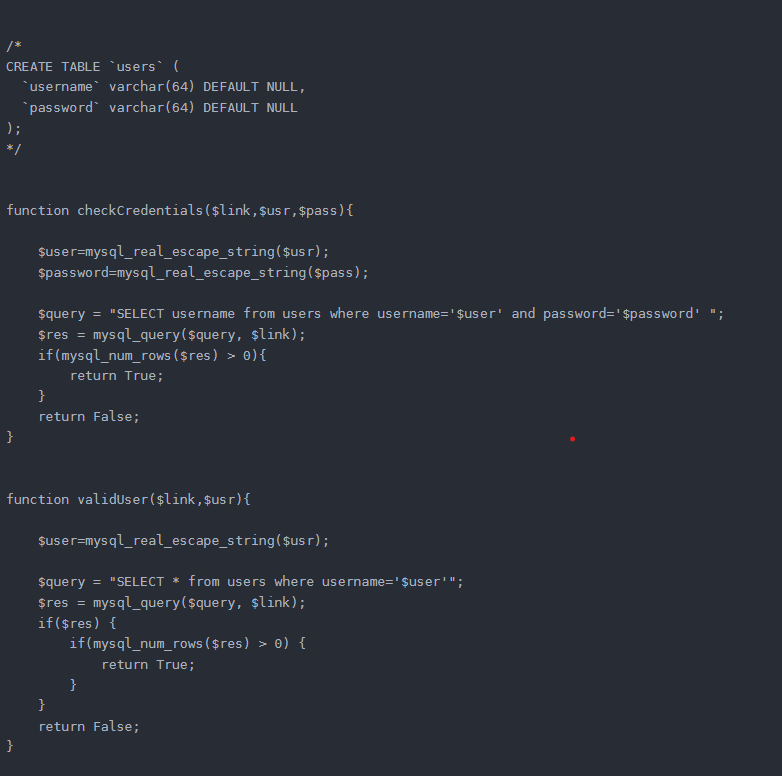
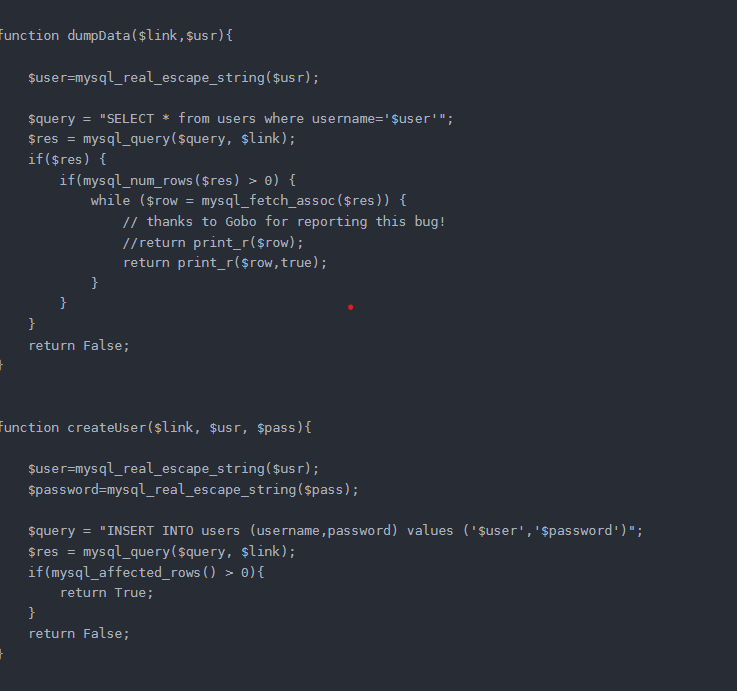
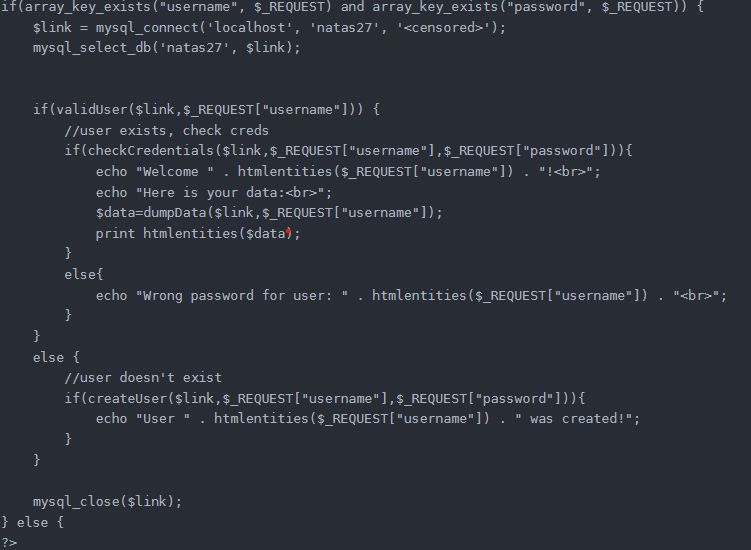
Checking the source code, I was trying to get the password through sql injection, but it’s hard to achieve:
Firstly, the source code escapes the special characters in the input username and password with the mysql-real-escape-string() function to prevent sql injection;
Secondly, it’s also difficult to get around if you want to: $password is enclosed using ”, which can’t be bypassed with like wildchar and number.
(See https://www.sqlinjection.net/advanced/php/mysql-real-escape-string/)
Continuing the analysis, the flow is summarised as follows:
Receive Input -> check if user exist -> if exist check credentials -> show data.
Receive Input -> check if user exist -> if dosen’t -> create user.
That is, after the background gets the username/password entered by the user, it will first check if the username exists, if it exists, check credentials and show data; if it doesn’t exist, create user.
At the same time, verifying that the username/password is correct is just a matter of seeing if the return array is > 0.
It is easy to imagine, if we insert a target account and the same line, even if we do not know the password, checkCredentials () function to find the results of the array will be > 0 and return true, and then dumpData () function may show back the real user and password. (Note that only one line will be displayed here, although dumpData () is a while loop, but the inner layer directly return print_r ($row, true))
There are two things that need to be implemented to insert data:
One is that the validUser() function does not find the user;
The second is that the username after storage and the target username to be the same, the password set yourself.
So how to achieve the insertion of the user name and the target username the same, but also make validUser () function can not find it?
Here also want to refer to two mysql inside the knowledge point :
First, the string storage if the “overflow”, mysql will automatically truncate to the maximum width;
Secondly, the space in the varchar will be automatically removed.
So, the correct insertion is “natas28 + more than 64 bytes of consecutive spaces + xxx” (note that the latter xxx is necessary, because in mysql ‘natas28’ = ‘ natas28+space’), and the password is optional and can be empty.
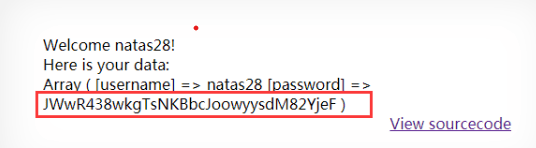
When comparing username mysql doesn’t truncate the submitted username, so it determines that the username doesn’t exist and starts a new username and password. Once it starts storing, an overflow/interception occurs, resulting in two lines with the same username as ‘natas28’. Then return to the login screen and enter natas28 + password. The seek operation returns the array just inserted (>0), so the query is successful, and the username and password are displayed back, and it’s the first natas28 line that’s displayed back, which is the flag we’re trying to get.
First of all, enter
Username: natas28 xxx
Password: aaa
The return is as follows:

rename and retry
 今朝有酒今朝醉